This is default featured slide 1 title

Go to Blogger edit html and find these sentences.Now replace these sentences with your own descriptions.

This is default featured slide 2 title

Go to Blogger edit html and find these sentences.Now replace these sentences with your own descriptions.

This is default featured slide 4 title

Go to Blogger edit html and find these sentences.Now replace these sentences with your own descriptions.

This is default featured slide 5 title

Go to Blogger edit html and find these sentences.Now replace these sentences with your own descriptions.

Showing posts with label Android. Show all posts

27 Nov 2013

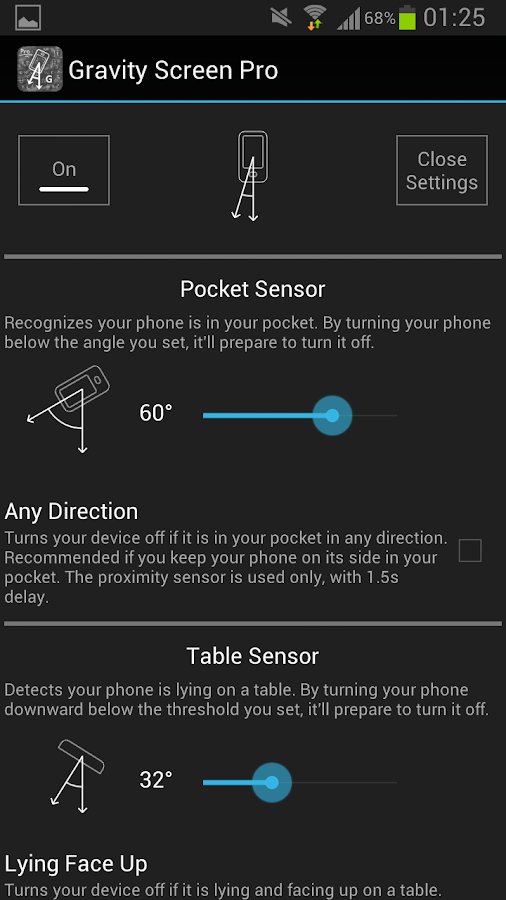
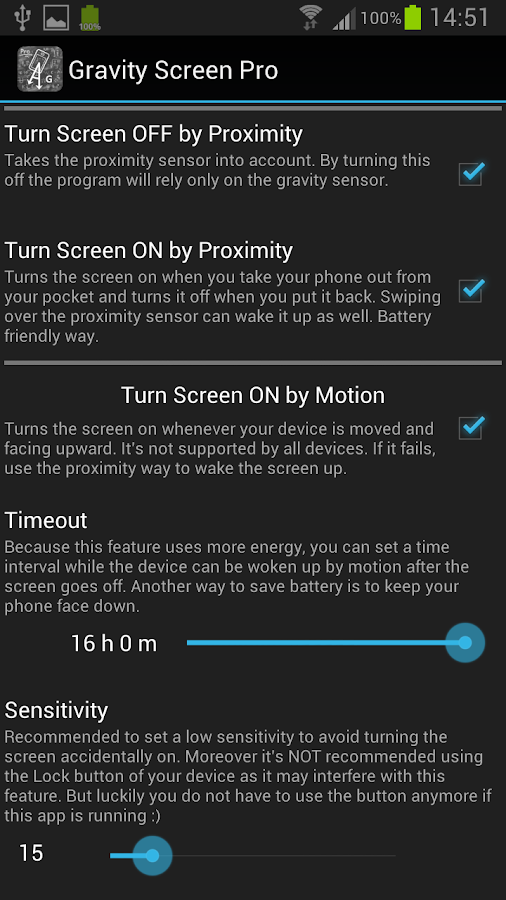
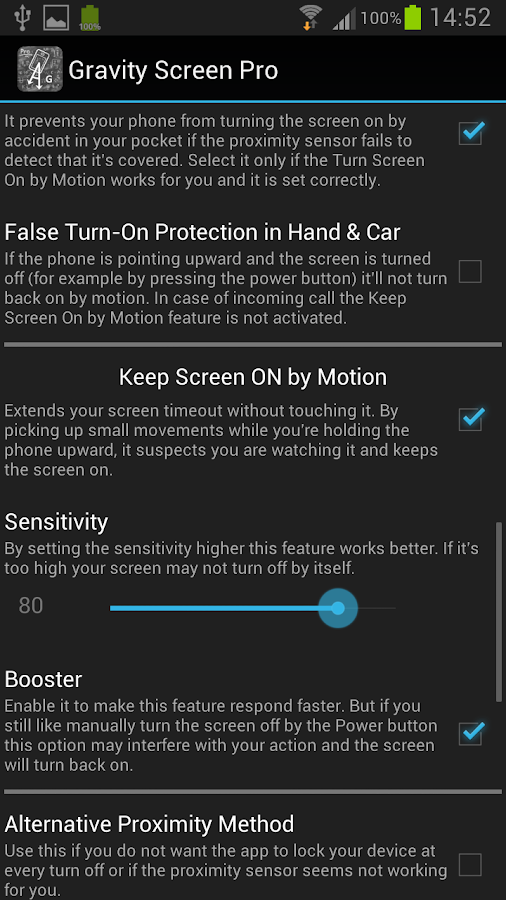
Gravity Screen - On / Off

 Gravity Screen - On / Off - screenshot


 Gravity Screen - On / Off


Using your phone often? Tired of the On-Off switching?
This app turns automatically your screen off when you put your phone into your pocket or onto a table and turn the screen on when you take it out or up. No need to touch any button and you are ready to go. 

HOW IT WORKS:
It monitors the orientation of the device through the gravity sensor. When your phone is pointing downward by its top, below a certain angle, it's likely to be out of use. In this situation the proximity sensor is activated to determine if it is covered. If yes, the screen turns off because probably you placed the phone into your pocket or onto a table.
To keep the battery usage low the program turns on the proximity sensor only when it's really necessary. Moreover, when it turns your screen off and the proximity sensor is covered it puts your phone into deep sleep state to save as much energy as possible.
MAIN FEATURES:
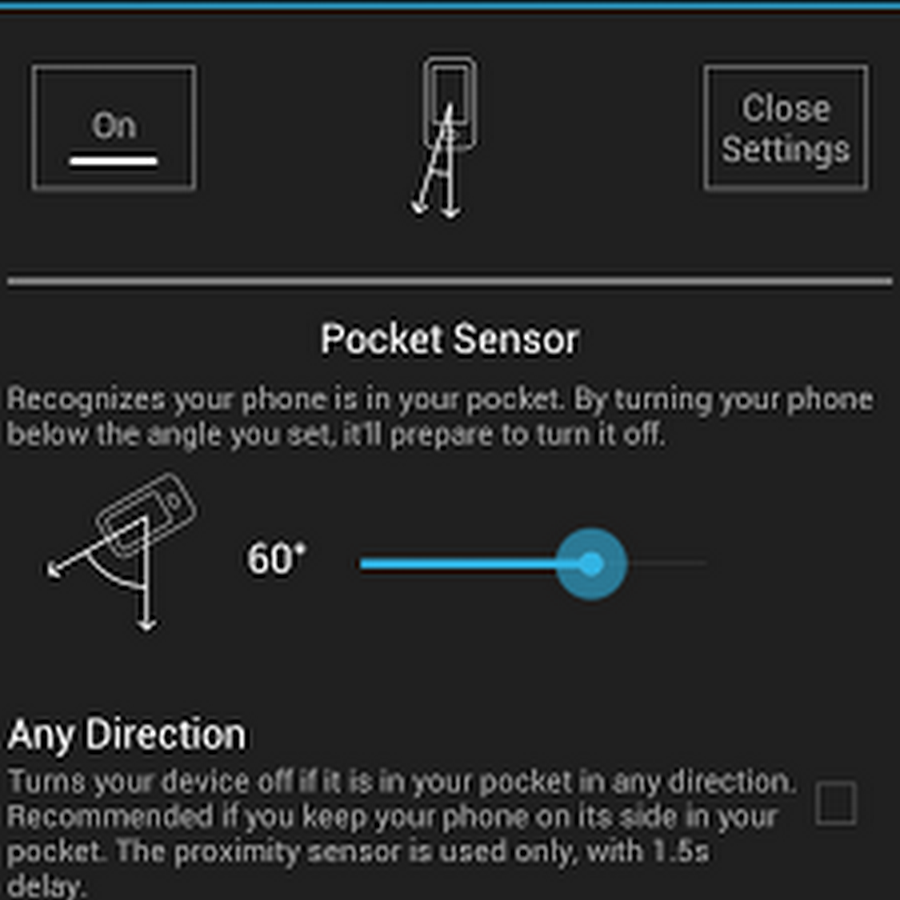
- Pocket Sensor: Recognizes if your phone is in your pocket.
- Table Sensor: Detects your phone is lying on a table and turns the screen off.
- Turn Screen On by Motion: If the screen is off and it's facing up the device can be woken up by any movements, for example lift up by hand.
- Keep Screen On by Motion: It's a Screebl like feature but it's relying on the small movements you are doing by your hand while holding the phone. If small motions are detected while the screen is facing up the feature keeps the screen on because it can be suspected that the phone is held and probably you are reading something. If the phone is steady the normal screen timeout will apply in any position you leave your device.
- Exclude Apps option: The app pauses itself anytime if selected app is running, it'll resume when you close the app. Useful when playing games etc.
- Tasker, Llama, Locale supported by plug-in.

BATTERY USAGE:
It should be not significant. I experienced about 6 per cent extra consumption on the test device. However it can be much higher by often using the Turn Screen On by Motion feature. Thus, keep your phone face down if you want to save energy.
IMPORTANT:
On some devices (e.g. HTC One) the alarm clock is switched off by the app after it had gone off! Please check if it's the case for you. If, yes, use a third party app, for example: https://play.google.com/store/apps/details?id=com.vp.alarmClockPlusDock
SIDE NOTE:
- The app was not widely tested. Hopefully it will work fine for you. But, if you experience any issue or just have a question, please email me.
FREE vs. UNLOCK vs. PRO VERSION
In the Pro version the screen can be turned on by motion up to 16 hours instead of 15 minutes. Also, in the Pro version the Table sensor is more accurate. Unlock version has everything what Pro has plus it can be paused if any app running from the Exclude app list.
FAQ
Q: The screen not always turns off when I put my phone into my pocket, why?
A:The proximity sensor not always accurate. It can fail recognizing some materials specially if they are very close to it. If it happens to you often, you can activate the False Turn-On Protection feature which effectively reduces the number of accidental wake-ups.
Q: I'm experiencing high battery usage, why?
A: The app should use about 6 percent extra energy per day if you are not using too much the Turn Screen On by Motion feature, for example keeping your phone face down when it's on a table. Moreover, please, keep in mind that the android en-built battery consumption measurement can show much higher results if it's based on a short period of time.

download this for ur phone

 ****download****

 Gravity Screen - On / Off - screenshot        Gravity Screen - On / Off - screenshot

15 Aug 2013

Google kills the Messenger in latest Google+ Android update

Google kills the Messenger in latest Google+ Android update


Google will shut down its Messenger group chatting service as part of an update to its Google+ app for Android-based devices, the company announced. Google also will ditch the service on iOS devices.
Google Hangouts, which performs similar messaging and video calling functions, will act as a replacement for Messenger, said Google software engineer Virgil Dobjanschi, in a Wednesday blog post. Google Messenger was a service for mobile devices designed for group conversations with text, photos, and face-to-face video chat.
Because Hangouts provides messaging and video calls across Android, iOS, and the Web, “we’re moving Messenger from the Google+ mobile apps, first on Android, then on iOS,” Dobjanschi said. Messenger will be shut down Wednesday for Android-based devices. A Google spokeswoman declined to comment further on when the service will be removed on iOS.
Users will be able to download all of their Messenger conversations, including text and photos, from Google’s Takeout data export service later on Wednesday, Dobjanschi said.

Competition

The offer of a transition to Hangouts, however, does not guarantee that users will stay, because the product occupies an increasingly crowded market of other group chat and messaging services. Competitors include Facebook’s Messenger service, WhatsApp, Rounds, and Imo messenger.
A Google Hangout
Google also faces pressure to distinguish its Google+ social network from large rivals like Twitter and Facebook. To make Google+ more attractive to users, the company announced more than 40 new featuresat its annual I/O conference for developers in May. Some of those enhancements included an improved interface and ongoing chat and photo improvements.
Google+ has roughly 190 million active users, the company reported in May. More than 390 million people are active across Google, which includes liking content in the Google Play Store, making video calls in Gmail and sharing YouTube videos.
Facebook, meanwhile, has more than 1 billion monthly active users, and Twitter has just over 200 million.
Google has recently shut down some other services in the process of updating its apps. Last month the company scrapped its Latitude and check-ins products as part of an update to its Maps app. Google Latitude provided a way for people to see the approximate locations of friends and others who have shared that information.

New features

Several new features are coming to the Google+ Android app that will be rolling out over the next few days, the company said on Wednesday.
While some of the location-sharing features might now be absent from Google Maps, there are additional tools in this area within the Google+ Android app.
With the new version of the app, location sharing includes more controls, so people can share their pinpoint or city-level location with others, and on a circle-by-circle basis, if they want, Google said. In other words, users can share their pinpoint location with family, and their city-level location with co-workers, according to the company.
The update also lets Google+ for Android interact more with Google’s Drive cloud storage service. If users are sharing photos or videos in Google Drive, they now have the option to view and share them from Google+ on Android and on the Web, Google said. Google’s photo auto-enhancement feature, which was first rolled out at the I/O conference, will be applied here as well.
A pull-to-refresh feature, which commonly lets people see the latest content within an app by pulling down on the screen, also is on the way for the app, Google said.
Follow TechHive on Tumblr today.

30 Jun 2013

TokBox

TokBox

TokBox Inc
Tokbox-175.png
Type Private
Headquarters San Francisco, California, California
Founder(s) Serge Faguet
Ron Hose
Key people Ian Small, CEO
Roelof Botha, Board Member
Scott Friend, Board Member
Bernd Girod, Board Member
Jawed Karim, Investor
Owner Telefónica Digital a subsidiary of Telefónica
Website www.tokbox.com
Alexa rank positive decrease 62,978 (April 2013)
Type of site Videoconferencing
TokBox provides a free API that allows anyone to add group video chat features to their own websites. Experienced programmers use the OpenTok API to build custom interactive video chat applications. More casual users can download OpenTok plug-n-play apps that provide the same group video chat capability when users drop them into their personal blogs or websites.
TokBox was founded by entrepreneurs Serge Faguet and Ron Hose and is financed by Sequoia Capital, Bain Capital and Youniversity Ventures. As of 2010, TokBox has received $14 million in series A and B funding and is headquartered in the South of Market district in San Francisco, CA. TokBox was acquired by Telefónica Digital a subsidiary of Telefónica in October 2012.
In 2011, TokBox changed its focus from running a branded video conferencing service to building the OpenTok API platform.

Features

Multi-party video chat

TokBox's OpenTok platform allows users to start a multi-party video chat with up to 20 people. The API does not require download for use and it is set up to allow the creator of the video chat to invite non-tokbox users into the call via email, instant messaging or by publishing the URL on their Twitter / Facebook / MySpace accounts.
OpenTok plug-n-play apps are downloadable widgets that allow users to quickly add group video chat functionality to their websites and blogs.

TokBox Platform & Partnerships

TokBox makes the OpenTok API available to partners who wish to add multi-party video chat to their own websites or applications.
TokBox lists SlideShare, eBuddy, Bibbil, ProctorU, McKinney, and PokerView as partners who use the API.


2007

August – Series A funding from Sequoia Capital
October – Launched www.tokbox.com
November – Launched multi-party chat and partnership with Meebo

2008

April – TokBox Version 2 launched
July – Series B Funding from Bain Capital Ventures and Sequoia Capital
September – Launched the TokBox platform/ API

2009

Added document collaboration tool—Etherpad (now owned by Google)

2010

January rolled out its first set of paid features--$9.99 per month.
November announced the OpenTok API

2011

February TokBox announced that as of April 5, 2011 they will be discontinuing the TokBox video chat and video conferencing service to focus solely on their API, OpenTok.

Controversy

TokBox was the subject of controversy when 50% of their engineering staff was fired in July 2009. This happened around the time TokBox changed CEOs. The VP of Marketing is stated as saying the firings were part of the CEOs new restructuring plan. None of the original founders are currently with TokBox.
Around 2007, one of the users had privacy issues—his friend was able to connect to his account—allowing his friend to view and hear him talk to himself. However, Tokbox seems to have addressed this issue now.

28 Jun 2013

Pidgin (software)

Pidgin (software)


Pidgin
Pidgin Logo
Initial release 1998 as Gaim
Stable release 2.10.7 (February 13, 2013; 4 months ago) 
Preview release None 
Written in C (C#, Perl, Python, Tcl are used for plugins)
Platform Cross-platform
Available in Multiple languages
Type Instant messaging client
License GNU General Public License
Website pidgin.im
Pidgin (formerly named Gaim) is an open-source multi-platform instant messaging client, based on a library named libpurple. Libpurple has support for many commonly used instant messaging protocols, allowing the user to log into various services from one application.
The number of Pidgin users was estimated to be over 3 million in 2007.

***......download.....***

Features


Pidgin running on Ubuntu
Pidgin provides a graphical front-end for libpurple using GTK+. Libpurple supports multiple instant-messaging protocols.
Pidgin supports multiple operating systems, including Windows as well as many Unix-like systems such as Linux, BSD, Mac OS X, and AmigaOS (through the X11 engine). It has built-in support for NSS, offering client-to-server message encryption for protocols that support it. The program is extendable through plugins, including "Off-the-Record Messaging" and Pidgin encryption, providing end-to-end message encryption.
Pidgin features some of the standard tools for an instant-messaging client, such as a contact list, file transfer on supported protocols, and conversation and chat logging. Tabbed conversations is an optional feature on Pidgin. The IM window consists of the message window, formatting tools, and an edit box.
Users can add contacts (usually known as "Buddies") in the "Buddy List" window or in the IM window. As a client that supports IRC and other chat programs, Pidgin can also add different IRC channels and IM Chats. Contacts with multiple protocols can be grouped into one single contact instead of managing multiple protocols, and contacts can be given aliases or placed into groups.
To reach users as they log on or a status change occurs (such as moving from "Away" to "Available"), Pidgin supports on-action automated scripts called Buddy Pounces to automatically reach the user in customizable ways.
Pidgin supports some file transfers, with the ability to cancel transfers and observe multiple transfers in a separate window, while lacking some protocol-specific features like the folder sharing available from Yahoo. Older versions of Pidgin did not support direct, peer-to-peer file transfers over the MSN protocol and instead relayed file transfers over a slower connection via the MSN servers. However, direct connection support has been added since Pidgin 2.7.
As of version 2.6 (released on August 18, 2009) Pidgin has a voice/video framework which uses Farsight2 and is based on Mike Ruprecht's Google Summer of Code project from 2008. That release provides the ability to have voice/video conversations using the XMPP protocol (including Google Talk), though the implementation is not yet fully complete. The framework will also allow for voice/video conversations on other protocols, such as MSN and Yahoo, in the future.
Further features include support for themes, emoticons, spell checking, and notification area integration.

Supported protocols

The following protocols are officially supported by libpurple 2.9.0, without any extensions or plugins:
Some XMPP servers provide transports, which allow users to access networks using non-XMPP protocols without having to install plugins or additional software. Pidgin's support for XMPP means that these transports can be used to communicate via otherwise unsupported protocols, including not only instant messaging protocols, but also protocols such as SMS or E-mail.
Additional protocols, supported by third-party plugins, include Microsoft OCS/LCS (extended SIP/SIMPLE), QQ, Skype via skype4pidgin plugin, and the Xfire gaming network (requires the Gfire plugin).

Plugins

Various other features are supported using third-party plugins. Such features include:

History


Gaim 2.0.0 beta 6 running under GNOME 2.16.0
The program was originally written by Mark Spencer, an Auburn University sophomore, as an emulation of AOL's IM program AOL Instant Messenger on Linux using the GTK+ toolkit. The earliest archived release was on December 31, 1998. It was named GAIM (GTK+ AOL Instant Messenger) accordingly. The emulation was not based on reverse engineering, but instead relied on information about the protocol that AOL had published on the web; development was also assisted by some of AOL's technical staff. Support for other IM protocols was added soon thereafter.

Naming dispute

In response to pressure from AOL, the program was renamed to the acronymous-but-lowercase gaim. As AOL Instant Messenger gained popularity, AOL trademarked its acronym, "AIM", leading to a lengthy legal struggle with the creators of GAIM, who kept the matter largely secret.
On April 6, 2007, the project development team announced the results of their settlement with AOL, which included a series of name changes: Gaim became Pidgin, libgaim became libpurple, and gaim-text became finch. The name Pidgin was chosen in reference to the term "pidgin", which describes communication between people who do not share a common language. The name "purple" refers to "prpl", the internal libgaim name for an IM protocol plugin.
Due to the legal issues, version 2.0 of the software was frozen in beta stages. Following the settlement, it was announced that the first official release of Pidgin 2.0.0 was hoped to occur during the two weeks from April 8, 2007. However, Pidgin 2.0 was not released as scheduled; Pidgin developers announced on April 22, 2007 that the delay was due to the preferences directory ".gaim".
Pidgin 2.0.0 was released on May 3, 2007. Other visual changes were made to the interface on 2.0.0, including updated icons.

Criticisms

  • Passwords are stored in a plaintext file. This password file is readable by anyone who has physical access to the computer, access to the user or administrative accounts, or (potentially) to anyone who is able to exploit security vulnerabilities on that computer. The developers recognize this as a security concern, but believe that the requirements of Pidgin (and the nature of instant messaging) make it infeasible to encrypt the password file, though they have said that they welcome solutions to integrate Pidgin with application-level security solutions.
  • Pidgin does not currently support resuming paused or incomplete file transfers in any of the applicable chat protocols
  • As of version 2.4 and later, the ability to manually resize the text input box of conversations has been altered—Pidgin now automatically resizes between a number of lines set in 'Preferences' and 50% of the window depending on how much is typed. Some users find this an annoyance rather than a feature and find this solution unacceptable. The inability to manually resize the input area eventually led to a fork, Carrier (originally named Funpidgin).
  • Pidgin does not allow disabling the group sorting on the contact list.


Supported Languages

Pidgin is translated into many different languages, thanks to the generous contributions of our volunteer translators.
  • Afrikaans                           
  • Albanian
  • American English
  • Arabic
  • Armenian
  • Armenian
  • Australian English
  • Azerbaijani
  • Belarusian Latin
  • Belarusian Latin
  • Bengali
  • Bokmal Norwegian
  • Bosnian
  • British English
  • Bulgarian
  • Canadian English
  • Catalan
  • Chinese
  • Czech
  • Danish
  • Dutch, Flemish
  • Dzongkha
  • English
  • Esperanto
  • Estonian
  • Euskera(Basque)
  • Finnish
  • French
  • Galician
  • Georgian
  • German
  • Greek
  • Gujarati
  • Hebrew
  • Hindi
  • Hong Kong Chinese
  • Hungarian
  • Indonesian
  • Irish
  • Italian
  • Japanese
  • Kannada
  • Khmer
  • Korean
  • Kurdish
  • Lao
  • Lithuanian
  • Macedonian
  • Malay
  • Marathi
  • Mongolian
  • Myanmar (Burmese)
  • Nepali
  • Norwegian Nynorsk
  • Occitan
  • Oriya
  • Pashto
  • Persian
  • Polish
  • Portuguese
  • Portuguese-Brazil
  • Punjabi
  • Romanian
  • Russian
  • Serbian
  • Serbian
  • Simplified Chinese
  • Sinhala
  • Slovak
  • Slovenian
  • Spanish
  • Swahili
  • Swedish
  • Tamil
  • Telugu
  • Thai
  • Traditional Chinese
  • Turkish
  • Ukranian
  • Urdu
  • Valencian-Catalan
  • Vietnamese
  • Xhosa

27 Jun 2013

Kidlogger Android spy app


Kidlogger is the software which you can use to spy on any Android cell phone without having to be all around it. Regardless of where in the entire world you do you think you're will be able to see all of that goes with in the phone being checked. The individual activity logarithm is secretly recorded along with converted in HTML data files so you could easily understand them. You can even upload log files from your Android OS phone for the KidLogger account. Once this can be done, you may then browse the files. Could that you do not have all time in world in order to stalk thus KidLogger volition report whenever you are totally free and ready to look.


To begin with, it will certainly record each activity going on in the phone. No telephone calls, text messages, web webpages being surfed, apps, or areas can possibly be hidden out of this ultimate adware. We recognize all that happens in the marked mobile's existence; well, providing all from it is within your Operating system phone. Furthermore, the activeness log is uploaded for your requirements at KidLogger.net. Just remember, all with this is totally free! You do not have to pay for this app – really amazing!

It's simple to know whom the goal is getting in touch with and a caller's identity him/your ex; you doesn't just be alert to the number of the company but in addition their get in touch with name. Also you can read the incoming text messages and the particular clipboard wording data. Furthermore, you can view regardless of if the Wi Fi, USB, Card and/or even GSM have been in use. Kids-logger enables you to see this applications which were accessed from the target telephone.Also, you can observe the earphone activity life cycle and all of the websites that have been visited for the monitored cell phone – URLs involved. You need to know what is being typed or maybe said about the phone? KidLogger Seasoned makes this possible for you. You could enter some keywords which when used are going to be informed to your account of. Today your children can't manipulation foul language without letting you know – though, involuntarily.Even when you are busy doing other points in your PC system this specific app is fine in the background but this particular feature is available in the Professional version your app. To create your existence easy, KidLogger restarts instantly when the product is restarted. Other than this, by way of the KidLogger Expert settings you can include password security which may restrict any kind of unwanted entry. Moreover, as a result of your account you can certainly browse every one of the log data files on the marked phone with any rush. You also can set the option which orders the cellphone to add log documents to your account so there is no need to consult for them yourself.

Kidlogger Android spy app


There are also versions for Windows,Linux, etc..
You can see the additional details in below website..

Download in OFFICIAL WEBSITE

Miranda IM

Miranda IM

Miranda IM
Miranda IM logo.svg
Developer(s) Miranda IM Project
Initial release 2 February 2000
Stable release 0.10.14 (19 June 2013; 7 days ago) 
Written in C, C++
Operating system Microsoft Windows
Type Instant messaging client
License GNU General Public License
Website www.miranda-im.org
Miranda IM is an open source multiprotocol instant messaging application, designed for Microsoft Windows. Miranda is free software distributed under GNU General Public License.


Architecture

Miranda IM provides a basic client framework, GUI, and an advanced plugin architecture. Support for various IM protocols and additional features is implemented through optional plugins, some of which come bundled with Miranda IM by default; the rest (over 500) are available on the official addons site. Unused protocols can be removed.

Features

  • Customized look and function according to each individual's needs.
  • Management and organization of hundreds of IM buddies on many IM networks
    • Contact renaming
  • Full message archive database
    • Simple recall or deletion with the DB Tool or History Sweeper plugin.
  • Contact details or photos visible with mouseover. (Needs additional plugin)
  • No advertising
  • Compact and portable: with few plugins
  • Security/Privacy: Saves history on hard disk
  • Low memory footprint

Connectivity

The protocol plugins included with Miranda IM are AIM, Gadu-Gadu, ICQ, IRC, Microsoft Messenger service (a.k.a. MSN, .NET, Live, etc.), XMPP (& Google Talk), and Yahoo! Messenger. Other protocols available via plugins include Bonjour Fetion, Facebook Messenger, Inter-Asterisk eXchange, Lotus Sametime, NetSend, MySpace, Tencent QQ, SIP, Skype (requires Skype), Tlen.pl, Xfire.

Early days

Miranda IM was first started by Roland Rabien (figbug) on February 2, 2000. At that time, it was a minimalist ICQ clone and officially called Miranda ICQ. The first public release, version 0.0.1, was released on February 6, 2000. This release used LibICQ, had no support for message history, database, and plugins, and had a distribution size of less than 100 KB.
A major new feature of version 0.0.4 was the MegaHAL chat bot, which enabled automatic chatting between Miranda and other ICQ users. Plugin support was added with version 0.0.6. Logger Plugin was the first plugin bundled with the official release.

Version 0.1.x

After the release of version 0.0.6.1 on December 26, 2000, the original developers left, and Richard "cyreve" Hughes took over the project. His first release, version 0.1.0.0 on April 8, 2001 was improved through a major rewrite. The split message dialog bundled with this release became the first messaging module to be put into a plugin. The .Net Messenger Service protocol plugin appeared around the time of version 0.1.1.0 release becoming the second messaging protocol to be supported by Miranda. This was also the first official release to support language pack translations. Miranda hence had multi-protocol, multi-language instant messenger features.
After v0.1.0.0, Miranda plugin development grew rapidly. With version 0.1.2.1 (February 28, 2002), there were approximately 50 plugins available. At the time the new Lizard plugin enabled skinning support; the only time Miranda supported skins. Lizard development stopped soon after, due to the instability it caused.

Version 0.2.x

After the mysterious disappearance of cyreve in June, 2002  the developers Martin Öberg (Strickz), Robert Rainwater (rainwater), Sam K (egoDust), and Lyon Lim (lynlimz) took over the project. The MSN protocol was taken over by Rako Shizuka who also developed the first version of Yahoo! Messenger protocol, which was the third protocol supported by Miranda. The Yahoo! plugin was closed source, and lost reliability as the official Yahoo! Messenger protocol changed over time - it was later re-written by new developer Gennady Feldman.
The first of the non-IM plugins, including RSS News and Weather, were released within this period. These added a contact to contact list for the purpose of displaying information to the user rather than chatting.
Discussion about renaming of the program and removal of ICQ from the core began about this time. Due to the increase of protocol support, the project was officially renamed to Miranda IM on December 17, 2002.
The first release under the new name occurred on February 1, 2003, about three years after the beginning of the project, and a bug fix version came two weeks later.

Version 0.3.x

The major change in version 0.3, released on June 23, 2003, was the removal of ICQ from the core into a plugin. From now on, Miranda could run without the ICQ application being installed. The project moved to a new site at www.miranda-im.org, featuring a new discussion board and file listing.
Protocol plugins bundled in version 0.3 included ICQ, MSN, AIM, and XMPP. The Yahoo! protocol was not included in the package. IRC support was added later by Jörgen Persson (m8rix) to the official release of version 0.3.1, on August 8, 2003.
Another major change was the removal of the Send-Receive Messaging Module from the core into a plugin, SRMM. This reduced the size of the executable file and encouraged rapid development of messaging modules. During this period many variations (including SRAMM, SRMM_mod, etc.) offered different new features and improvements over the standard implementation.
ZDNet.be reviewed release 0.3, complimenting its "effortless" contact importing, low memory usage, and extensive variety of plugins, and stating, "Miranda is a strong recommendation for people who have a system tray populated by several IM applications."

Version 0.4.x

Miranda IM, customized with plugins and skins.
Version 0.4 of Miranda IM was released on April 7, 2005. This was the first version to have Yahoo! protocol bundled with the official release. Other major changes included the removal of contact list and database module from the core into plugins. As a result, there were 4 variations of contact list modules: the original clist_classic, multi-window contact list clist_mw, modern contact list clist_modern, and nicer contact list with extensive UI customization clist_nicer. Other popular plugins released within this period included tabbed message window (tabsrmm and scriver), HTML based message log support IE view, scripting plugin mbot, and the meta contact plugin.

Version 0.5.x

Version 0.5 of Miranda IM was released on July 28, 2006. This is the first version to have Unicode support available as a download option for Windows NT, 2000 and XP users. Another new feature is the introduction of AIM Oscar, first released in early 2006, allowing users to transfer files and receive away messages. This version also provided more support for avatars among the various protocols.

Version 0.6.x

Customized Miranda IM 0.6.8 - plugins (Modern Contact List, SmileyAdd, Scriver...), skin (WIP Zune), icons, colors, etc...
Version 0.6 of Miranda IM was released on December 29, 2006. This version introduced UPnP support to improve file transfer and direct connect reliability through routers. Other changes included improved support for UTF-8 strings, improved tabbed options support, and numerous bug fixes.

Version 0.7.x

Version 0.7 of Miranda IM was released on October 1, 2007. Key changes included integrated font and icon services, a rewritten menu engine, and a release notifier. One large change is a new way to uniquely identify plugins and the interfaces they implement which may break backward compatibility in the future.
A 2008 CNET review gave the program 4 out of 5 stars, noting that though the interface is "plain", the program supports most IM protocols in one package. Features favored in the review included its centralized personal information management, "numerous" window behavior controls, and configurable hotkeys.
Techzine.nl reviewed this version, listing its positive attributes as "support for many protocols; small and fast; a lot of plug-ins and skins; many settings" and writing it "will not look bad on your computer. Especially if you are looking for a simple client on a USB stick then Miranda IM is a good choice." On the other hand, "if you are using WLM (Windows Live Messenger) and you find the settings of the program hard, [we] can not recommend Miranda IM. The typical things like WLM's smilies, sounds, winks and games are not standard. You do get that functionality by the wide choice of skins and plug-ins, but for that you do some research and setting work."
Authors Lui and Chan in Software Development Rhythms describe using Miranda IM's plugin architecture to copy, modify, and test existing plugins in order to develop "NAMMIK", a scriptable ICQ chatting bot used to interview people; they refer to Miranda IM's architecture as "simple and flexible".

Version 0.8.x

Version 0.8 of Miranda IM was released on June 17, 2009. It included a new Account Manager which supports multiple accounts per protocol (doing away with DLL renaming), built-in SSL support, various enhancements and bugfixes for the core and plugins.
A PCWorld Magazine review of version 0.8.16 noted its addon capability, but stated, "Miranda's user interface leaves something to be desired" while referring to its login status icons, wishing for easier management and grouping of contacts, easy blocking/reporting of spammers, and ultimately recommending it "for those who use only surface capabilities of instant messengers."

Version 0.9.x

Version 0.9 of Miranda IM was released on August 24, 2010. It consists of many new features focused on improving Unicode support and overall protocol improvements. It is also the first Miranda IM version to feature an official 64-bit build.

Version 0.10.x

Version 0.10 of Miranda IM was released on July 18, 2012. It consists of enhancements to Miranda IM 0.9.x including improved language support and improved networking support.

Miranda NG

In May 2012 Miranda IM was forked to Miranda NG (New Generation). The reasons were differences in the development team and slow-moving development of original Miranda. Main differences between original client and fork are: moving to VS2010 compiler thus deprecating ANSI version, core and plugins development is combined and share unified repository.

26 Jun 2013

Meetro

Meetro

Developer(s) Meetro, Inc
Stable release 1.0 / May 1, 2007 
Operating system Microsoft Windows, Mac OS X
Type Social messenger, Instant Messaging, Social Networking
License proprietary
Website www.meetro.com


Meetro was a multi-network social messenger with location-based services (LBS). It was compatible with AOL Instant Messenger, Yahoo! Messenger, MSN Messenger, GTalk, XMPP, and ICQ. Meetro's features made it useful for meeting people with similar interests in a given area, as well as bundling multiple messaging protocols into one program. Meetro was located in San Francisco, California.
Meetro is a software that runs on Windows and Mac OS X operating systems.

Launch and Early History

Meetro launched on June 1, 2005. On August 14, 2005, Slashdot reported a rumor that Meetro was in talks to be bought out by search giant Google. Paul Bragiel, CEO of Meetro, crafted the rumor and promoted it via sites like digg.com as a publicity stunt to attract attention.

How it Works

Meetro differed from the other popular messengers in that users could input location specifications to see other online users in surrounding areas. Its location finder was strongest in the Americas and Europe but worked the world over. Users unable to obtain a location could input latitude and longitude details to see how far away other online users are at a particular moment.
Meetro worked by actively scanning for the MAC addresses of wireless access points around a user's location. Then Meetro contacted the main database server and compared the MAC address to a list of known access points. Subsequently it did some mathematical calculations to determine the latitude and longitude of a location. Once Meetro had calculated the general area (usually a quarter mile) of a user's physical location, it then compared it to others users and displayed who's online within a quarter mile, half mile, mile, etc... A user's exact location was never displayed to other people on the network for privacy and security reasons. Meetro would only present that a user is within a range of 1/4 of a mile. Users could choose to make information of their location public, such as "I'm at the cafe on 2nd and Broadway."
Shortly before closing, Meetro added support for business address look-ups in the United States as an alternative method for users to report their location.

Features

Meetro allowed users to create custom profile pages which could be searched and browsed by other users nearby. Meetro's profiles supported feeds for videos, photos, and blogs in addition to the typical social networking profile questions. Users had the option of embedding dynamic feeds from their YouTube videos, Flickr photos, and their personal blogs directly into their profiles. Meetro was one of the few services offering 'profile aggregation' - crawling the web to aggregate a user's digital persona.
Meetro was different than other social networks and messengers in the fact that as soon as you signup, you're able to talk with other users who are nearby instantly, even if they're not approved 'friends'. This is to encourage communication between nearby people.
Towards then end of 2006, Meetro introduced features to display places and services that were nearby (in addition to people). Meetro will display nearby restaurants, cafes, and bars on a map. Meetro had planned to also display the local weather and nearby geotagged photos.
Meetro had introduced a number of location based web widgets, including a StatusBadge that would display a user's last known real-world location on their blog, email, or personal webpage.
Meetro allowed users to create real-time personalized groups within the client. These groups could be configured to show a specific subset of Meetro users grouped by any combination of: Status (away/available), Gender (male, female, unspecified), Minimum Distance, Maximum Distance, Keywords, Relation (friend, friend of a friend, unrelated, MeetroHQ). For example, you could create a group that includes all users that are between 3 and 4 miles away and are currently online. Meetro was one of the only messengers to have a rule-based grouping system, as opposed to other messengers which do not use any personal descriptors or location to sort and filter users.

Company Background

Meetro originally started in Chicago, IL with a small team working and living out of the same house. The team moved to Palo Alto, CA in late 2005 and continued the same live/work situation. Meetro grew and enjoyed press coverage for its atypical live/work ethic, including a front page story in the San Francisco Chronicle.At the time of closing, Meetro headquartered in San Francisco's SoMa district.


Kopete

Kopete


Kopete
Nuvola apps kopete.png
Developer(s) KDE
Stable release 1.2.3 (May 4, 2012; 13 months ago) 
Written in C++ (Qt)
Operating system Unix-like
Type Instant messaging client
License GNU General Public License
Website kde.org/applications/internet/kopete/
Kopete (ko-PEH-tEH) is a multi-protocol, free software instant messaging client released as part of the KDE Software Compilation. Although it can run in numerous environments, it was designed for and integrates with the KDE Plasma Workspaces. Kopete was started because ICQ blocked Licq from their network in 2001. According to the original author, Duncan Mac-Vicar Prett, the name comes from the Chilean Spanish word copete, meaning "a drink with your friends". Kopete has been nominated for multiple awards.The designated successor is KDE Telepathy from the KDE RTCC Initiative.

Protocols

Kopete allows users to connect to the following protocols:

Features

  • Grouping messages within a window, with tabs for easy switching of conversations
  • Ability to use multiple accounts on multiple services
  • Alias nicknames for contacts
  • Contact grouping
  • Custom notifications for contacts
  • KAddressBook and KMail integration
  • Conversation logging
  • Custom emoticons
  • Custom notifications, including popups and sounds
  • QQ and Yahoo! messenger webcam support
  • On the fly spell checking
  • Voice call via GoogleTalk and Skype

Plugins

By default, Kopete supports the following plugins (not all of which are currently functional):
  • Auto Replace
  • Connection Status
  • Contact Notes
  • Cryptography
  • Highlight
  • History
  • KopeteTeX
  • Motion Auto-Away
  • Now Listening
  • Statistics
  • Text Effect
  • Translator (no longer functional since the closure of both the Google Translate API and BabelFish)
  • Web Presence
With third-party plugins, Kopete supports:
Deeksha. Powered by Blogger.